> ## Documentation Index
> Fetch the complete documentation index at: https://docs.corvic.ai/llms.txt
> Use this file to discover all available pages before exploring further.
# Settings
> Manage account settings, organization configuration, and integrations
The Settings page allows you to manage your account profile, access tokens, and organization-level configuration including LLM integrations, data connectors, team members, audit logs, usage tracking, and subscription plans.
Access Settings by clicking the Settings icon in the navigation sidebar.
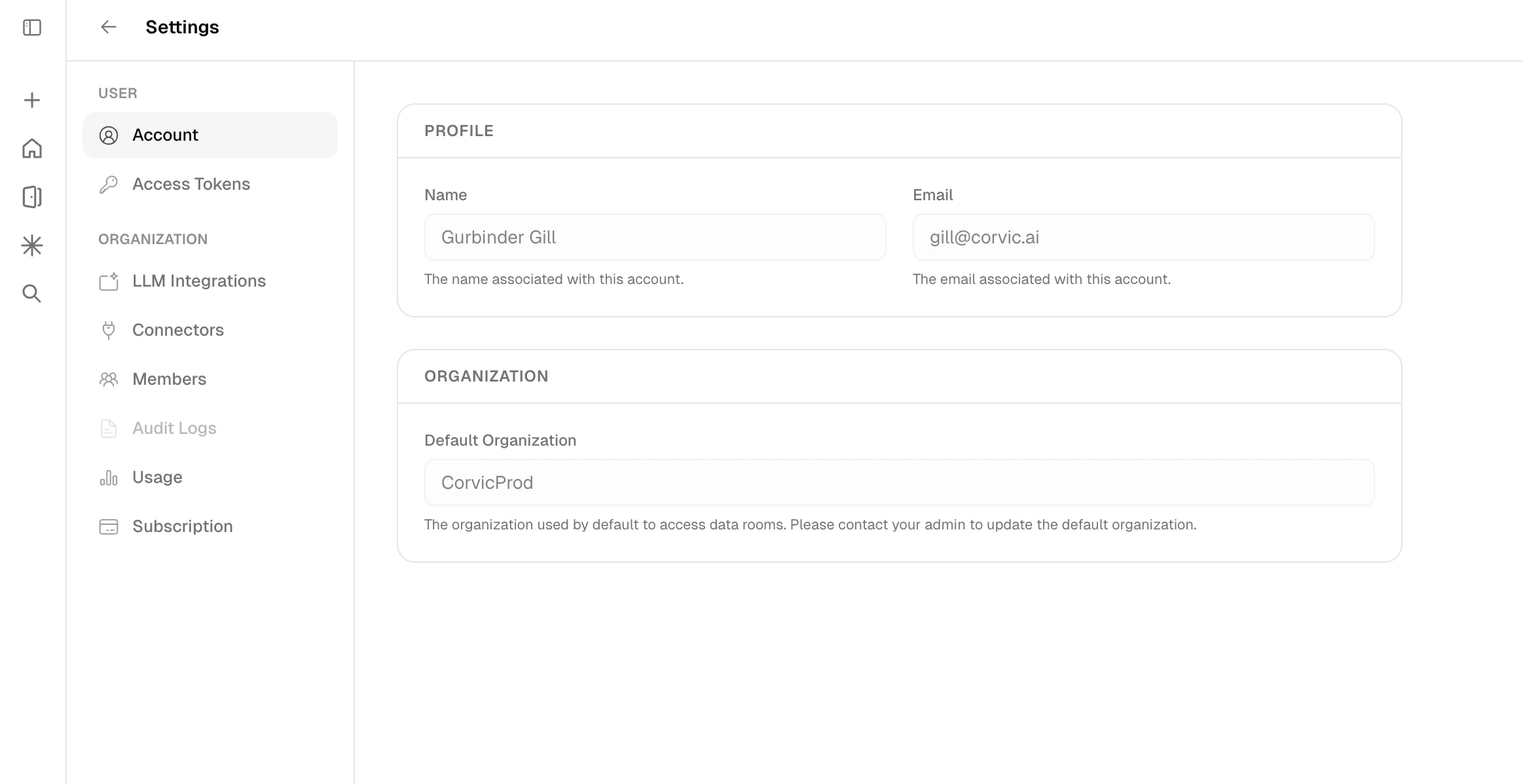 The Settings sidebar is organized into two sections:
| User | Organization |
| ----------------------------------------------------------- | --------------------------------------------------- |
| **Account** — profile name, email, and default organization | **LLM Integrations** — add custom LLM endpoints |
| **Access Tokens** — generate and manage API tokens | **Connectors** — configure external data connectors |
| | **Members** — invite and manage team members |
| | **Audit Logs** — review organization activity |
| | **Usage** — monitor agent and computational usage |
| | **Billing** — manage payment details and invoices |
| | **Plan** — view and change your subscription plan |
## Data Connectors
Connect external data sources to seamlessly integrate your data into AI workflows. Corvic supports **Amazon S3**, **Azure Blob Storage**, and **Snowflake**.
Click **+ Add data connector** and select your provider.
For **Amazon S3**, provide your Access Key ID, Secret Access Key, Bucket Name, and Region. For **Azure Blob Storage**, provide the Account URL, container path, and authentication credentials.
Use the **Validate** action to verify credentials and paths before using the connector in your rooms.
The Settings sidebar is organized into two sections:
| User | Organization |
| ----------------------------------------------------------- | --------------------------------------------------- |
| **Account** — profile name, email, and default organization | **LLM Integrations** — add custom LLM endpoints |
| **Access Tokens** — generate and manage API tokens | **Connectors** — configure external data connectors |
| | **Members** — invite and manage team members |
| | **Audit Logs** — review organization activity |
| | **Usage** — monitor agent and computational usage |
| | **Billing** — manage payment details and invoices |
| | **Plan** — view and change your subscription plan |
## Data Connectors
Connect external data sources to seamlessly integrate your data into AI workflows. Corvic supports **Amazon S3**, **Azure Blob Storage**, and **Snowflake**.
Click **+ Add data connector** and select your provider.
For **Amazon S3**, provide your Access Key ID, Secret Access Key, Bucket Name, and Region. For **Azure Blob Storage**, provide the Account URL, container path, and authentication credentials.
Use the **Validate** action to verify credentials and paths before using the connector in your rooms.
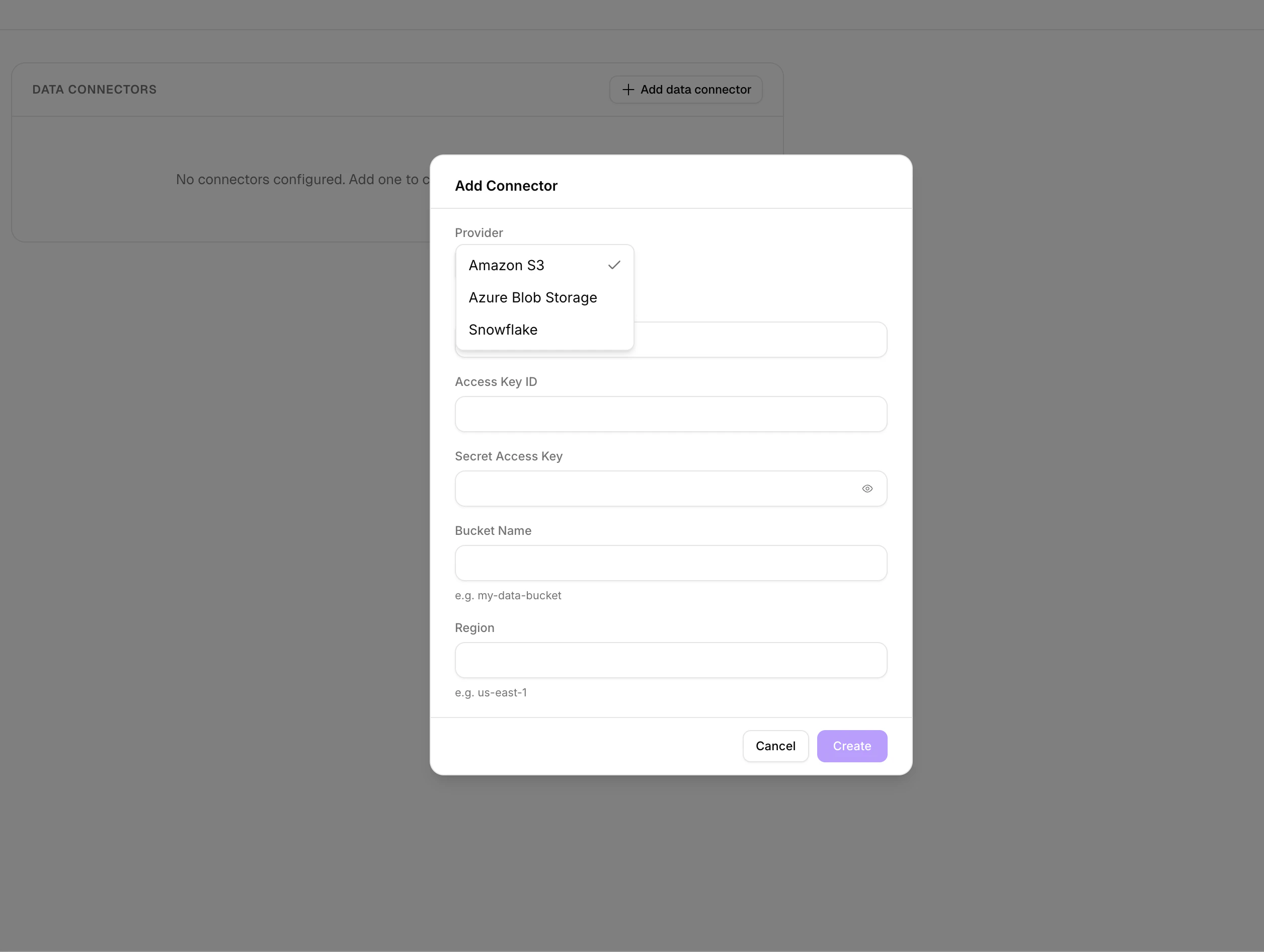 Connectors can be validated, edited, or removed at any time.
Data Connectors can be added, edited, or removed only by Admins of an organization.
## LLM Integrations
Bring your own Large Language Model for agent completions.
Click **+ Add LLM endpoint** and choose your compatible API type.
Select from:
* **OpenAI Generic** — works with Databricks (recommended), Groq, Keyword AI, Ollama, OpenRouter, Together AI
* **Azure OpenAI** — Azure-hosted OpenAI deployments
* **Gemini** — Google Gemini models
Fill in the endpoint URL, model name, and API key, then validate to confirm the connection.
Connectors can be validated, edited, or removed at any time.
Data Connectors can be added, edited, or removed only by Admins of an organization.
## LLM Integrations
Bring your own Large Language Model for agent completions.
Click **+ Add LLM endpoint** and choose your compatible API type.
Select from:
* **OpenAI Generic** — works with Databricks (recommended), Groq, Keyword AI, Ollama, OpenRouter, Together AI
* **Azure OpenAI** — Azure-hosted OpenAI deployments
* **Gemini** — Google Gemini models
Fill in the endpoint URL, model name, and API key, then validate to confirm the connection.
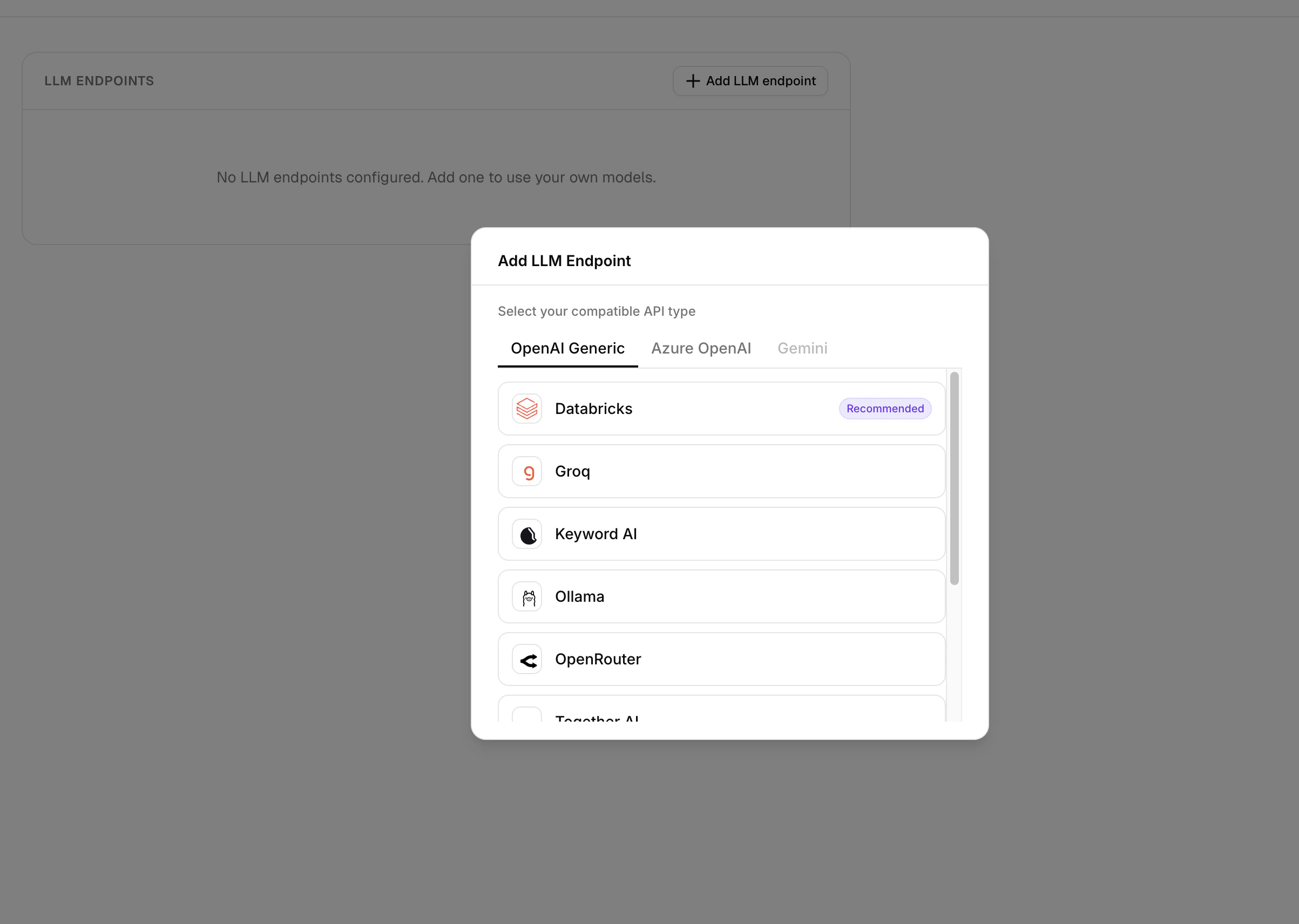 LLM Integrations can be added, edited, or removed only by Admins of an organization.
## Member Management
Invite new users to your organization, assign roles, and manage access levels from the **Members** section.
Click **Invite Members**, enter the user's email, and assign a role.
The invitee receives an email link to join. Track pending invites under the **Pending** tab and active members under **Joined**.
Admins can change roles (Admin or Member) and remove members. The organization must always have at least one admin.
An organization can only have 10 members on the Premium plan.
## Usage
The Usage section provides a comprehensive view of your organization's resource consumption. The overview dashboard shows current usage across all key metrics — Total Storage, Pages Parsed, Rows Parsed, and Total LLM Queries — with progress bars against your plan limits. Below that, the **Metered Rooms** table lists each data room with its total data size, last modified date, and status.
LLM Integrations can be added, edited, or removed only by Admins of an organization.
## Member Management
Invite new users to your organization, assign roles, and manage access levels from the **Members** section.
Click **Invite Members**, enter the user's email, and assign a role.
The invitee receives an email link to join. Track pending invites under the **Pending** tab and active members under **Joined**.
Admins can change roles (Admin or Member) and remove members. The organization must always have at least one admin.
An organization can only have 10 members on the Premium plan.
## Usage
The Usage section provides a comprehensive view of your organization's resource consumption. The overview dashboard shows current usage across all key metrics — Total Storage, Pages Parsed, Rows Parsed, and Total LLM Queries — with progress bars against your plan limits. Below that, the **Metered Rooms** table lists each data room with its total data size, last modified date, and status.
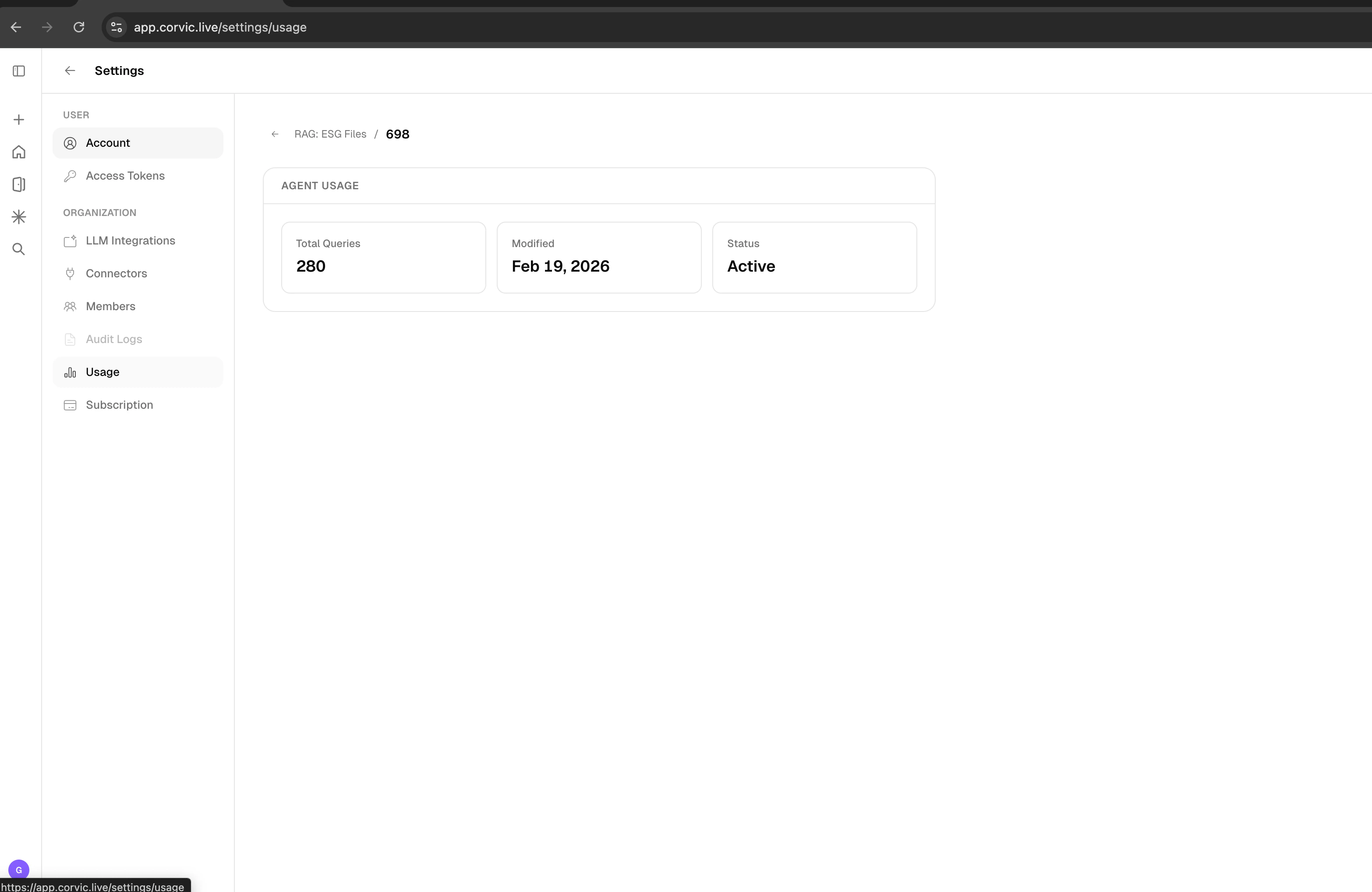
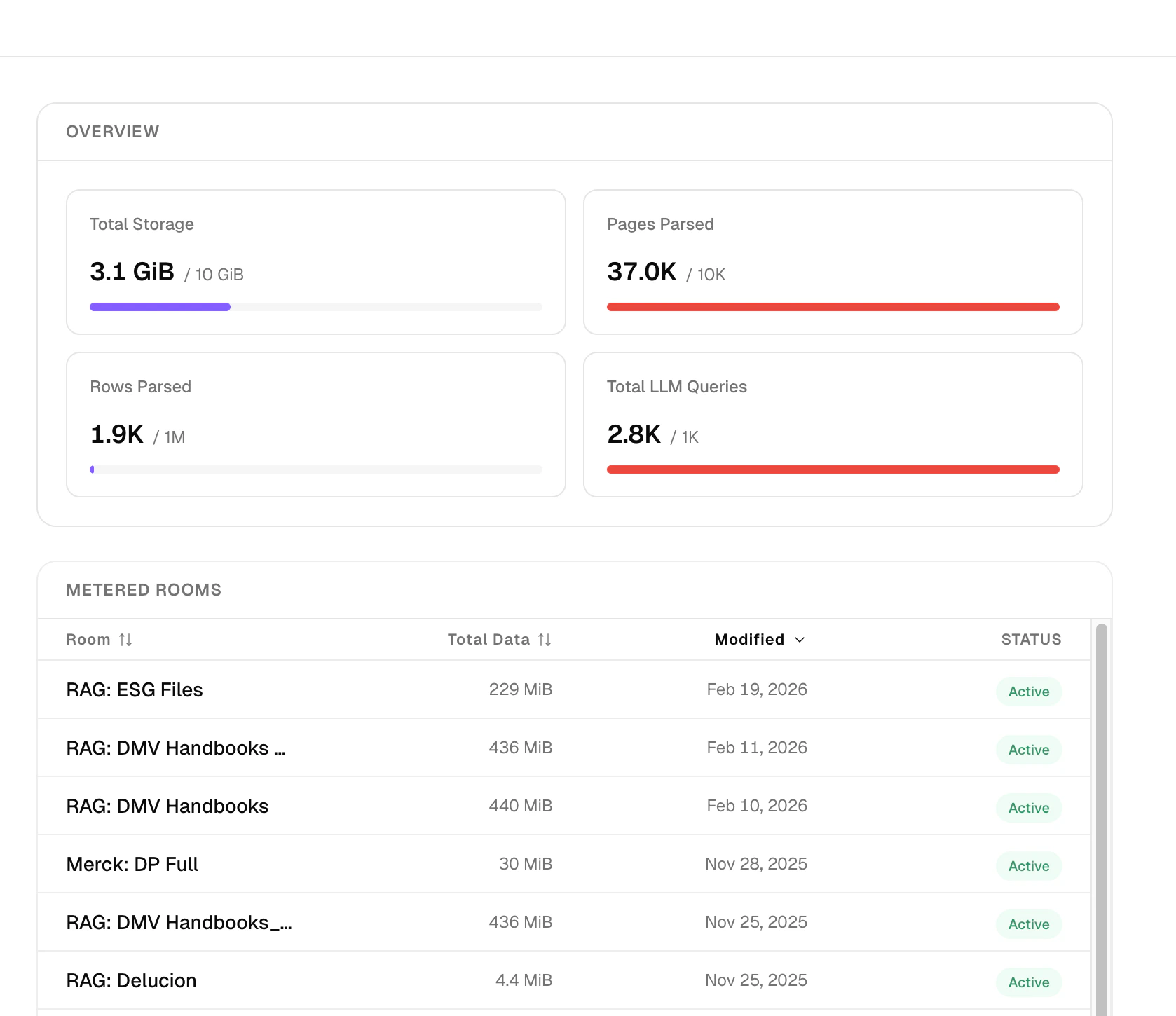 Click into any room to view per-agent usage statistics including total queries, last modified date, and current status.
 ## Subscription Plans
Corvic offers three subscription tiers — **Developer**, **Premium**, and **Enterprise** — with usage-based overages so you can scale gradually.
## Subscription Plans
Corvic offers three subscription tiers — **Developer**, **Premium**, and **Enterprise** — with usage-based overages so you can scale gradually.
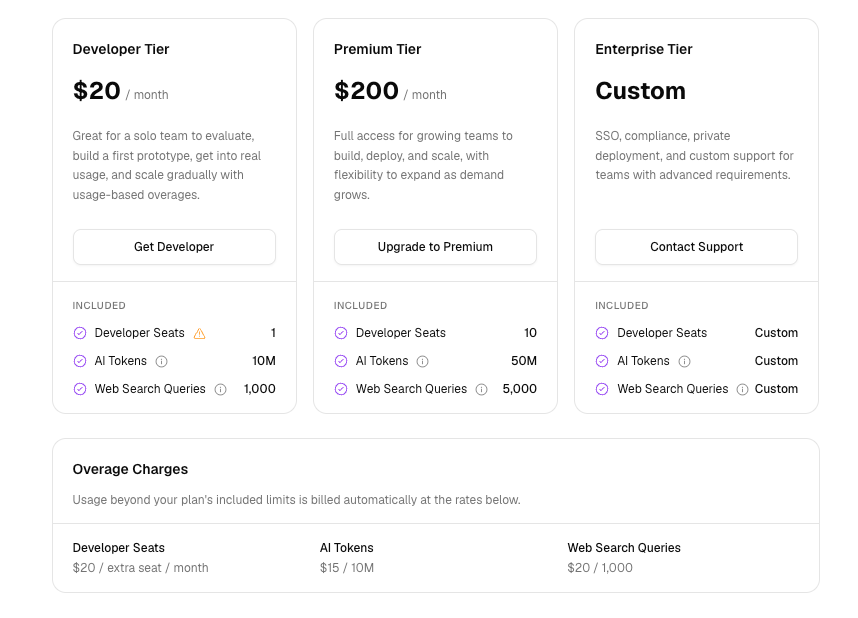 | | Developer | Premium | Enterprise |
| ---------------------- | ---------------------------------------------------- | ---------------------------------------------- | --------------------------------------------------------------------- |
| **Price** | \$20 / month | \$200 / month | Custom |
| **Best for** | Solo teams evaluating and building a first prototype | Growing teams building, deploying, and scaling | Teams needing SSO, compliance, private deployment, and custom support |
| **Developer Seats** | 1 | 10 | Custom |
| **AI Tokens** | 10M | 50M | Custom |
| **Web Search Queries** | 1,000 | 5,000 | Custom |
| | [Get Developer](https://app.corvic.ai/) | [Upgrade to Premium](https://app.corvic.ai/) | [Contact Support](mailto:support@corvic.ai) |
### Overage Charges
Usage beyond your plan's included limits is billed automatically at the rates below:
| Resource | Rate |
| ---------------------- | ------------------------- |
| **Developer Seats** | \$20 / extra seat / month |
| **AI Tokens** | \$15 / 10M |
| **Web Search Queries** | \$20 / 1,000 |
## Related Documentation
Learn about user access and account setup.
Learn about creating and managing data rooms.
| | Developer | Premium | Enterprise |
| ---------------------- | ---------------------------------------------------- | ---------------------------------------------- | --------------------------------------------------------------------- |
| **Price** | \$20 / month | \$200 / month | Custom |
| **Best for** | Solo teams evaluating and building a first prototype | Growing teams building, deploying, and scaling | Teams needing SSO, compliance, private deployment, and custom support |
| **Developer Seats** | 1 | 10 | Custom |
| **AI Tokens** | 10M | 50M | Custom |
| **Web Search Queries** | 1,000 | 5,000 | Custom |
| | [Get Developer](https://app.corvic.ai/) | [Upgrade to Premium](https://app.corvic.ai/) | [Contact Support](mailto:support@corvic.ai) |
### Overage Charges
Usage beyond your plan's included limits is billed automatically at the rates below:
| Resource | Rate |
| ---------------------- | ------------------------- |
| **Developer Seats** | \$20 / extra seat / month |
| **AI Tokens** | \$15 / 10M |
| **Web Search Queries** | \$20 / 1,000 |
## Related Documentation
Learn about user access and account setup.
Learn about creating and managing data rooms.