> ## Documentation Index
> Fetch the complete documentation index at: https://docs.corvic.ai/llms.txt
> Use this file to discover all available pages before exploring further.
# Room Templates
> Launch a pre-built data room with a ready-to-use agent, skills, and starter questions.
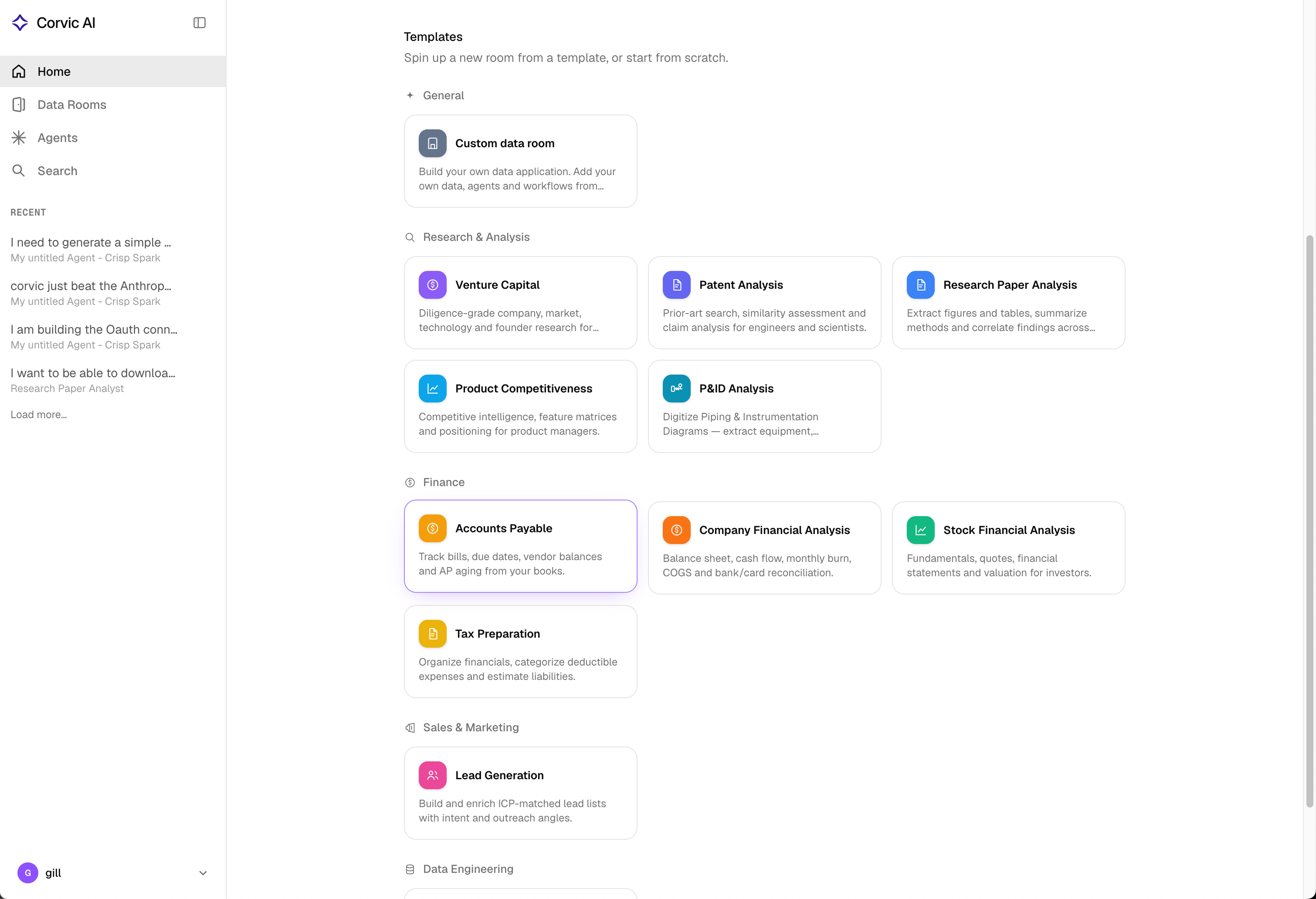
Room Templates are the fastest way to get value from Corvic. Instead of starting from an empty room, pick a template tailored to a use case — venture capital, patent analysis, financial research, lead generation, and more — and Corvic provisions a room with a **pre-configured agent**, the **skills** that agent needs, **starter questions**, and any **external API connectors** the workflow depends on.
 ## Using a template
From the **Home** page or the **Rooms** page, click **Create Room** (or **Use a template**) to open the gallery. Templates are grouped by category.
Each card shows what the template does, the agent it seeds, the skills included, the data you should bring, and example questions. Select one to preview the details.
If the template's agent depends on external services (for example, Crunchbase or PubMed), you'll be prompted to paste the API keys. These are stored securely in the [API Secret Vault](/features/api-secret-vault) and allowlisted for the agent.
Corvic creates the room and the pre-configured agent. Add your data, then start asking the agent the starter questions to see it work.
Choose the **Custom data room** template to start from a blank room and build your own data, agents, and workflows from scratch.
## Template categories
Templates are organized into five categories:
| Category | Focus |
| ----------------------- | ---------------------------------------------------------------- |
| **General** | Start from scratch with a custom data room |
| **Research & Analysis** | Diligence, prior-art, literature, and competitive research |
| **Finance** | Bookkeeping, financial statements, equity research, and tax prep |
| **Sales & Marketing** | Lead sourcing, enrichment, and prioritization |
| **Data Engineering** | Ingestion, cleaning, profiling, and ML feature engineering |
## Available templates
### Research & Analysis
Diligence-grade company, market, technology, and founder research for investors. Seeds a **Venture Capital Analyst** agent.
* **Skills:** Market Research Reports, Competitor X-Ray
* **Connectors:** Crunchbase, Scrapfly, DataForSEO, Apify, Firecrawl
* **Bring:** pitch decks, financial models, and a list of companies/tickers to diligence
Prior-art search, similarity assessment, and claim analysis for engineers and scientists. Seeds a **Patent Analyst** agent.
* **Skills:** Patent Analysis, HTML Comparison Report
* **Connectors:** SerpApi (Google Patents), Apify
* **Bring:** an invention disclosure plus any patents/specs to compare against
Extract figures and tables, summarize methods, and correlate findings across papers. Seeds a **Research Paper Analyst** agent.
* **Skills:** Scientific Document Research
* **Connectors:** PubMed (NCBI E-utilities), Apify
* **Bring:** the research papers (PDFs) and the question or hypothesis to address
Competitive intelligence, feature matrices, and positioning for product managers. Seeds a **Competitive Intelligence Analyst** agent.
* **Connectors:** Crunchbase
* **Bring:** your product materials and the competitors/capabilities to track
Digitize Piping & Instrumentation Diagrams — extract equipment, instruments, valves, pipes, and topology into validated, audited XML. Seeds a **P\&ID Analysis Expert** agent that drives a five-stage extraction pipeline (OCR → tiling → element extraction → JSON-to-XML merge → audit & refinement).
* **Skills:** P\&ID Image Tiler, P\&ID Element Extractor, P\&ID JSON-to-XML Merger, P\&ID Audit & Refinement
* **Connectors:** a vision-capable, OpenAI-compatible API
* **Bring:** your P\&IDs as PDFs or images
### Finance
Track bills, due dates, vendor balances, and AP aging from your books. Seeds an **Accounts Payable Analyst** agent.
* **Connectors:** QuickBooks
* **Bring:** bills, invoices, POs, or an AP/aging export
Balance sheet, cash flow, monthly burn, COGS, and bank/card reconciliation. Seeds a **Financial Analyst** agent.
* **Skills:** Financial Analysis Report
* **Connectors:** QuickBooks, Apify
* **Bring:** financial statements and bank/credit-card exports
Fundamentals, quotes, financial statements, and valuation for investors. Seeds an **Equity Research Analyst** agent.
* **Connectors:** Finnhub, Polygon, SerpApi (Google Finance), Apify (Morningstar)
* **Bring:** the tickers/watchlist to analyze; optionally your own models or filings
Organize financials, categorize deductible expenses, and estimate liabilities. Seeds a **Tax Analyst** agent.
* **Connectors:** QuickBooks
* **Bring:** income/expense records, receipts, and prior-year returns
### Sales & Marketing
Build and enrich ICP-matched lead lists with intent signals and outreach angles. Seeds a **Lead Generation Analyst** agent.
* **Skills:** ICP Prospect Pipeline, Lead Generation Dashboard
* **Connectors:** Apollo.io
* **Bring:** your ICP definition; optionally existing account/CRM lists
### Data Engineering
Ingest from HuggingFace and Kaggle, clean and profile data, and build ML-ready feature views. Seeds a **Data Engineer** agent.
* **Skills:** Data & Feature Engineering
* **Connectors:** HuggingFace, Kaggle
* **Bring:** raw datasets (CSV/Parquet/JSON) and a description of the ML task
The template catalog evolves over time. The gallery in the product is always the source of truth for which templates, skills, and connectors are available today.
## What a template provisions
When you launch a non-blank template, Corvic creates:
* A **data room** to hold your sources, tables, spaces, and agents
* A **pre-configured agent** with a persona and task instructions tuned to the use case
* The **skills** that agent relies on (loaded server-side)
* **Starter questions** surfaced as suggestion chips and in the chat's "Sample questions" menu
* The **custom API connections** the agent needs (you provide the keys)
## Related Documentation
Learn about data rooms and workspace isolation.
Manage the external API keys templates use.
Configure and chat with the agent a template seeds.
The room experience where you'll work with your template.
## Using a template
From the **Home** page or the **Rooms** page, click **Create Room** (or **Use a template**) to open the gallery. Templates are grouped by category.
Each card shows what the template does, the agent it seeds, the skills included, the data you should bring, and example questions. Select one to preview the details.
If the template's agent depends on external services (for example, Crunchbase or PubMed), you'll be prompted to paste the API keys. These are stored securely in the [API Secret Vault](/features/api-secret-vault) and allowlisted for the agent.
Corvic creates the room and the pre-configured agent. Add your data, then start asking the agent the starter questions to see it work.
Choose the **Custom data room** template to start from a blank room and build your own data, agents, and workflows from scratch.
## Template categories
Templates are organized into five categories:
| Category | Focus |
| ----------------------- | ---------------------------------------------------------------- |
| **General** | Start from scratch with a custom data room |
| **Research & Analysis** | Diligence, prior-art, literature, and competitive research |
| **Finance** | Bookkeeping, financial statements, equity research, and tax prep |
| **Sales & Marketing** | Lead sourcing, enrichment, and prioritization |
| **Data Engineering** | Ingestion, cleaning, profiling, and ML feature engineering |
## Available templates
### Research & Analysis
Diligence-grade company, market, technology, and founder research for investors. Seeds a **Venture Capital Analyst** agent.
* **Skills:** Market Research Reports, Competitor X-Ray
* **Connectors:** Crunchbase, Scrapfly, DataForSEO, Apify, Firecrawl
* **Bring:** pitch decks, financial models, and a list of companies/tickers to diligence
Prior-art search, similarity assessment, and claim analysis for engineers and scientists. Seeds a **Patent Analyst** agent.
* **Skills:** Patent Analysis, HTML Comparison Report
* **Connectors:** SerpApi (Google Patents), Apify
* **Bring:** an invention disclosure plus any patents/specs to compare against
Extract figures and tables, summarize methods, and correlate findings across papers. Seeds a **Research Paper Analyst** agent.
* **Skills:** Scientific Document Research
* **Connectors:** PubMed (NCBI E-utilities), Apify
* **Bring:** the research papers (PDFs) and the question or hypothesis to address
Competitive intelligence, feature matrices, and positioning for product managers. Seeds a **Competitive Intelligence Analyst** agent.
* **Connectors:** Crunchbase
* **Bring:** your product materials and the competitors/capabilities to track
Digitize Piping & Instrumentation Diagrams — extract equipment, instruments, valves, pipes, and topology into validated, audited XML. Seeds a **P\&ID Analysis Expert** agent that drives a five-stage extraction pipeline (OCR → tiling → element extraction → JSON-to-XML merge → audit & refinement).
* **Skills:** P\&ID Image Tiler, P\&ID Element Extractor, P\&ID JSON-to-XML Merger, P\&ID Audit & Refinement
* **Connectors:** a vision-capable, OpenAI-compatible API
* **Bring:** your P\&IDs as PDFs or images
### Finance
Track bills, due dates, vendor balances, and AP aging from your books. Seeds an **Accounts Payable Analyst** agent.
* **Connectors:** QuickBooks
* **Bring:** bills, invoices, POs, or an AP/aging export
Balance sheet, cash flow, monthly burn, COGS, and bank/card reconciliation. Seeds a **Financial Analyst** agent.
* **Skills:** Financial Analysis Report
* **Connectors:** QuickBooks, Apify
* **Bring:** financial statements and bank/credit-card exports
Fundamentals, quotes, financial statements, and valuation for investors. Seeds an **Equity Research Analyst** agent.
* **Connectors:** Finnhub, Polygon, SerpApi (Google Finance), Apify (Morningstar)
* **Bring:** the tickers/watchlist to analyze; optionally your own models or filings
Organize financials, categorize deductible expenses, and estimate liabilities. Seeds a **Tax Analyst** agent.
* **Connectors:** QuickBooks
* **Bring:** income/expense records, receipts, and prior-year returns
### Sales & Marketing
Build and enrich ICP-matched lead lists with intent signals and outreach angles. Seeds a **Lead Generation Analyst** agent.
* **Skills:** ICP Prospect Pipeline, Lead Generation Dashboard
* **Connectors:** Apollo.io
* **Bring:** your ICP definition; optionally existing account/CRM lists
### Data Engineering
Ingest from HuggingFace and Kaggle, clean and profile data, and build ML-ready feature views. Seeds a **Data Engineer** agent.
* **Skills:** Data & Feature Engineering
* **Connectors:** HuggingFace, Kaggle
* **Bring:** raw datasets (CSV/Parquet/JSON) and a description of the ML task
The template catalog evolves over time. The gallery in the product is always the source of truth for which templates, skills, and connectors are available today.
## What a template provisions
When you launch a non-blank template, Corvic creates:
* A **data room** to hold your sources, tables, spaces, and agents
* A **pre-configured agent** with a persona and task instructions tuned to the use case
* The **skills** that agent relies on (loaded server-side)
* **Starter questions** surfaced as suggestion chips and in the chat's "Sample questions" menu
* The **custom API connections** the agent needs (you provide the keys)
## Related Documentation
Learn about data rooms and workspace isolation.
Manage the external API keys templates use.
Configure and chat with the agent a template seeds.
The room experience where you'll work with your template.