

execute_python: the proxy injects your secret into the request, so the credential never appears in agent code, logs, or chat history.
This is what powers connectors used by Room Templates: when a template needs Crunchbase, PubMed, or Apify, those are API Secret Vault connections.
Find it under Settings → Connectors → API Secret Vault.
How it works
When an agent makes an HTTP request to a connected API’s origin, Corvic’s proxy automatically attaches the stored credential to the correct header (or query parameter). Your agent’s code references the connection by name and never handles the raw secret.Connector catalog
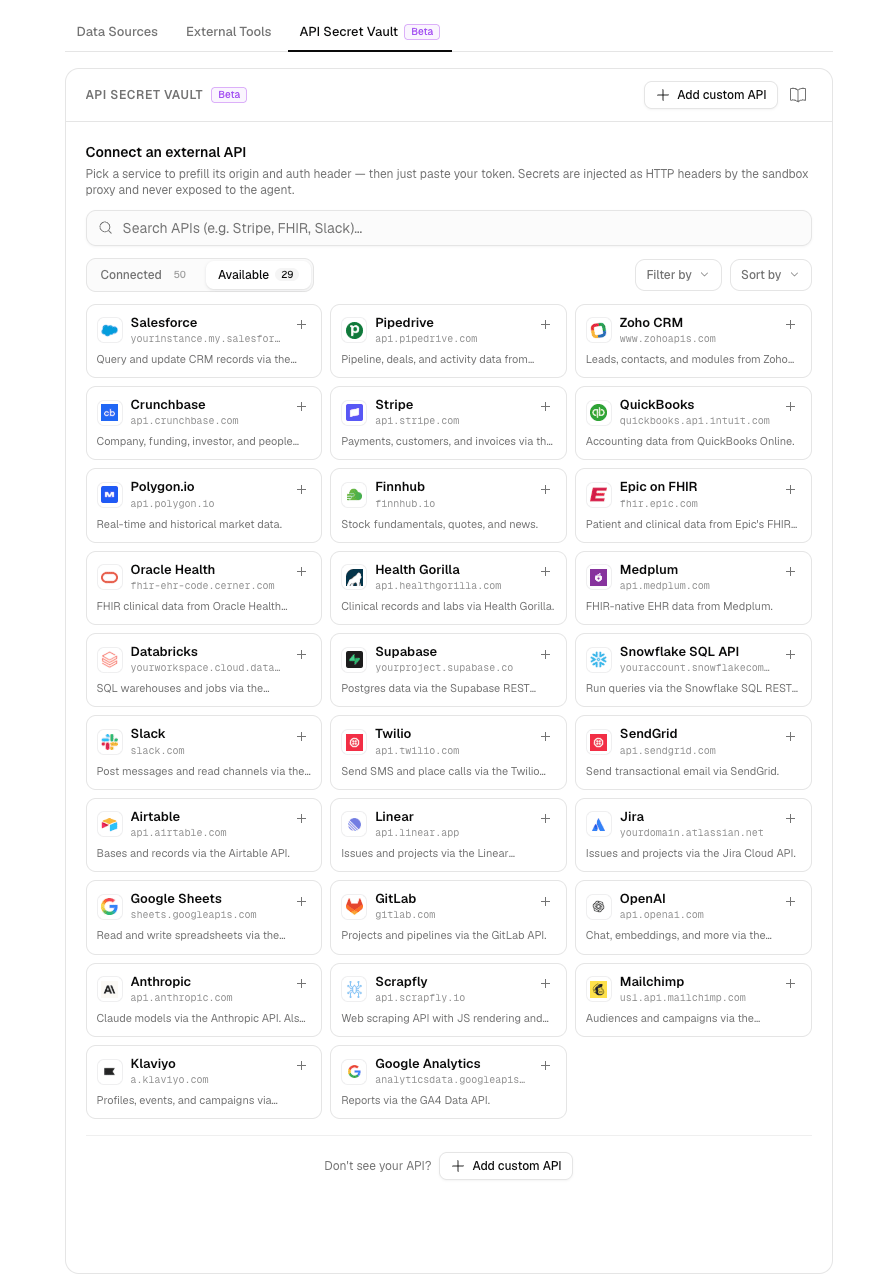
The catalog includes one-click presets for 35+ common services, grouped by category. Each preset prefills the API origin and the correct authentication header so connecting is just “pick a service and paste your token.” The categories below are listed in the page navigation for quick reference.Presets never carry a real secret: only the shape of the request (origin, header name, and an example value). Nothing sensitive ships in the product bundle; your credential is only stored when you enter it.
Sales & CRM
Salesforce
HubSpot
Pipedrive
Zoho CRM
Crunchbase
Apollo.io
Finance
Stripe
QuickBooks
Polygon.io
Finnhub
SerpApi
SerpApi covers Google Finance, Patents, Search, and more.
Healthcare
PubMed (NCBI E-utilities)
Epic on FHIR
Oracle Health (Cerner)
Health Gorilla
Medplum
Databases & Data
Databricks
Supabase
Snowflake SQL API
HuggingFace
Kaggle
Communication
Slack
Twilio
SendGrid
Productivity
Notion
Airtable
Linear
Jira
Google Sheets
Google Drive
Gmail
Google Calendar
Microsoft
Box
Dropbox
Developer
GitHub
GitLab
OpenAI
Anthropic
Scrapfly
Apify
Firecrawl
Marketing
Mailchimp
Klaviyo
DataForSEO
Custom integration
API Key
Use an API key, personal access token, or other static credential to connect a service. Select a catalog preset or add a custom HTTPS origin, then enter the value in the format the service expects. Corvic stores the value securely and injects it into requests from allowlisted agents. Supported formats include bearer tokens, service-specific headers, basic authentication, and query parameters.1
Add a connection
Pick a service from the catalog (one click prefills the host and auth scheme) or add a custom origin manually.
2
Paste your credential
Enter the API key, token, or basic-auth value. Presets show the expected format (for example,
Bearer sk-… or Basic <base64>).3
Allowlist it for an agent
Grant specific agents access to the connection. From then on, the agent can call that API from
execute_python.OAuth
Connect OAuth 2.0 services by supplying the application details below. After authorization, Corvic securely stores the resulting credentials and refreshes the access token when needed, so agents can continue calling the service without handling tokens directly. You need:- Client ID: the public identifier for the OAuth application you registered with the provider.
- Client secret: the private credential that proves Corvic is acting on behalf of that application. Keep it confidential.
- Scopes: the permissions your integration needs, such as read access to contacts or permission to create issues. Request only the minimum required scopes.
- Token endpoint URL: the provider URL Corvic calls to exchange an authorization code for access and refresh tokens, and later to refresh the access token.
- Authorization endpoint URL: the provider URL where the user signs in and approves the requested scopes.
- Additional authorization parameters: provider-specific values added to the authorization request. To receive a refresh token, providers may require
access_type=offline,prompt=consent, anoffline_accessscope, or another documented parameter.
Dedicated IP
If a connected service only accepts requests from known IP addresses, turn on Dedicated IP for its connection. Its requests then always come from a fixed pair of Corvic addresses that you can allowlist.Related Documentation
Dedicated IP
Reach services behind an IP allowlist.
Room Templates
Templates that rely on these connectors.
Agents
Allowlist connections for an agent.
Python & SQL
Call connected APIs from agent code.